

What are the different user access levels in JobScore?
Updated 2 months ago
There are 5 access levels. Here's who is typically given each one:
Owner: Talent and HR leadership
Admin: Full cycle recruiters
Extended: Coordinators, sourcers, and executives who need self-service access to reports
Standard: Hiring managers and other hiring team members who perform phone interviews
Limited: Everyone else in the company
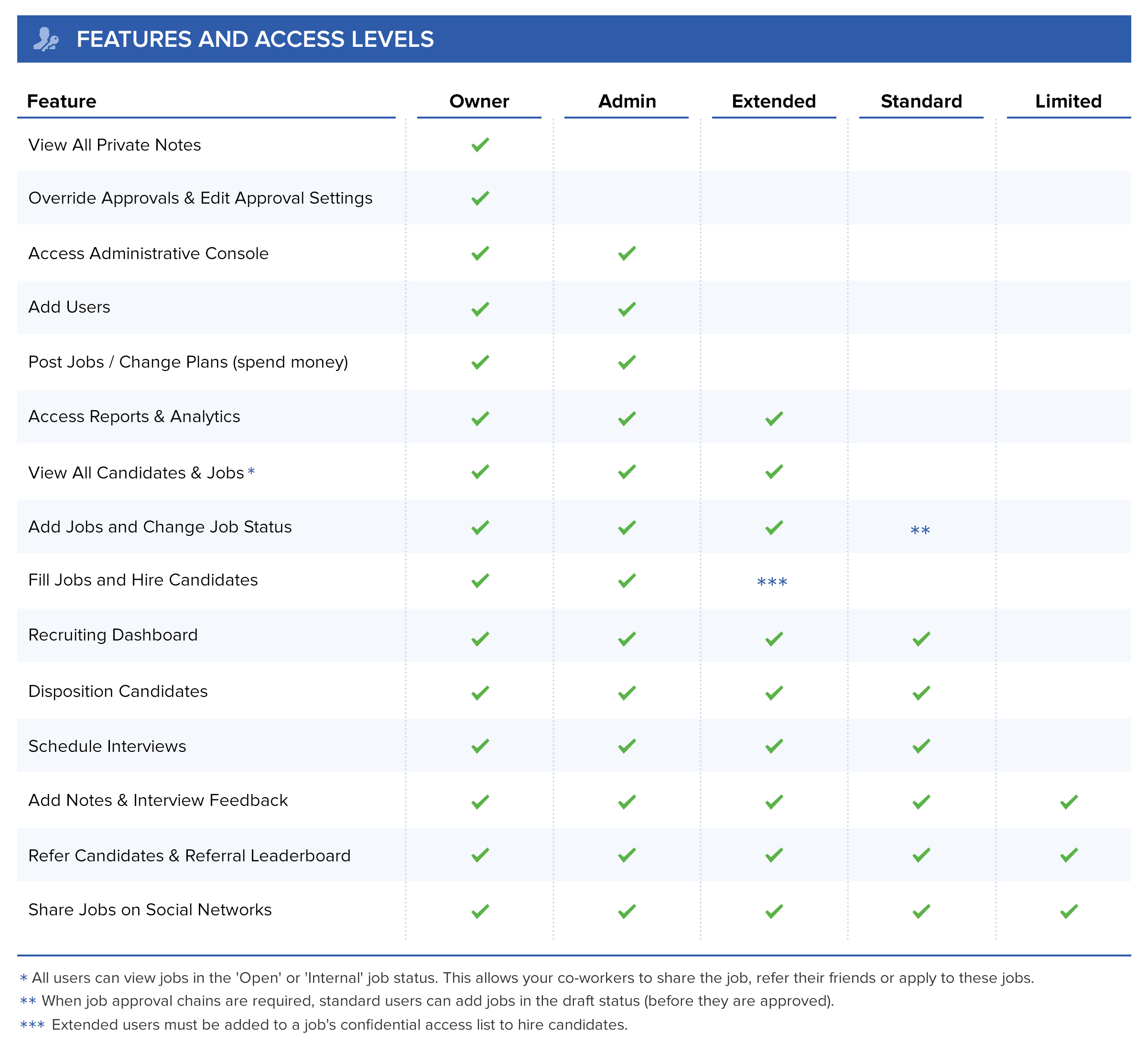
The features available on each access level:
More data permission controls:
Access Levels are the main way to control who can see what in JobScore, but there are three additional fine-grained controls:
Private Notes: You can restrict who can read specific notes. Learn more about private notes >>
Confidential Access: You can grant users with the EXTENDED or STANDARD access level the ability to see fields that are normally hidden. Learn more about confidential fields & access >>
Editing Jobs: Users with the STANDARD access level on a hiring team can edit job descriptions, job details and the job application form.
Please contact [email protected] to learn more about access levels and permissions in JobScore